The popup after a call or message
When the app captures a call or message it shows a small popup over whatever you are doing. It needs the Display Over Other Apps permission. The popup is a chance to tidy the entry while the activity is fresh; it is not required.
Calls, texts, and messages
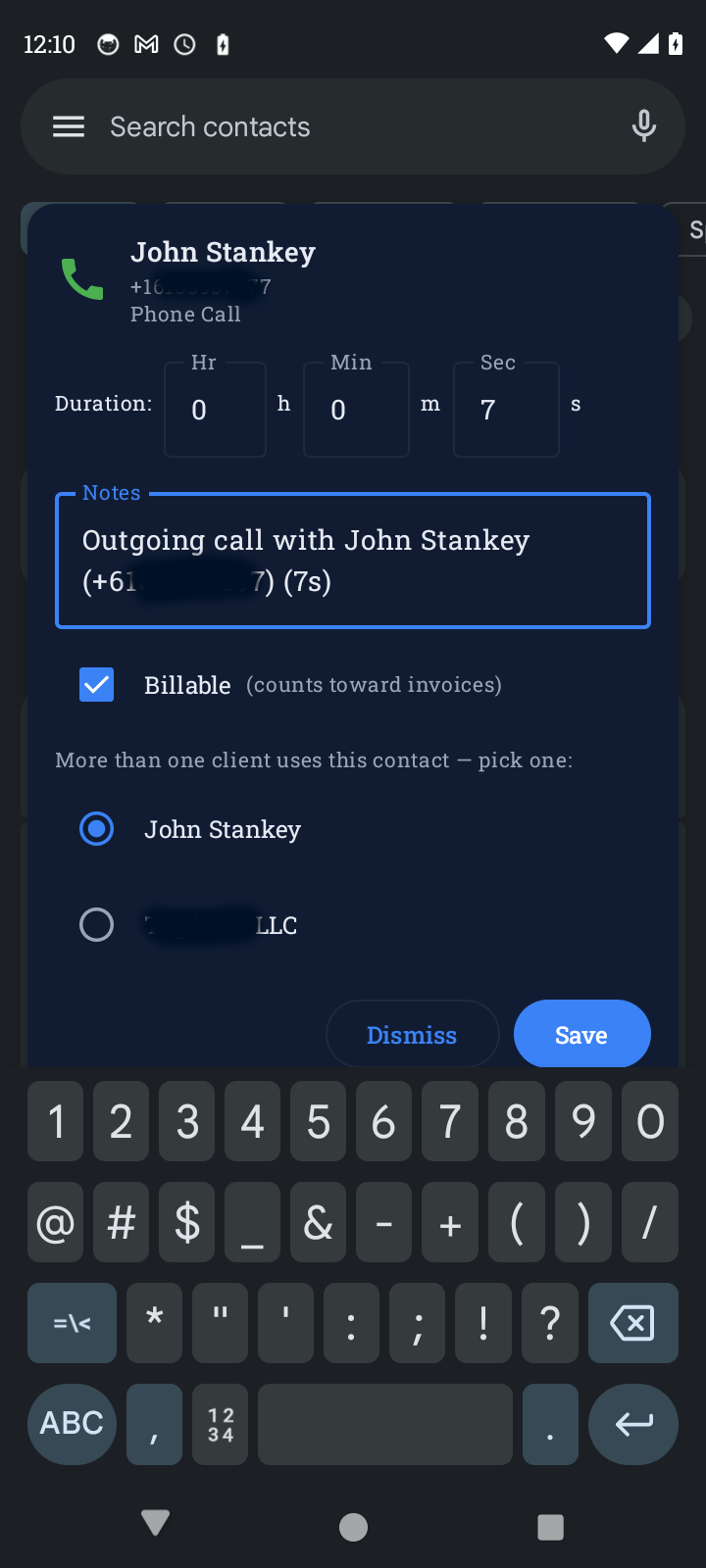
The entry is already saved before the popup appears, with the client matched, the duration filled in, and Billable switched on. The popup shows:
- The client's name and the type: Phone Call, SMS, RCS Message, WhatsApp Message, and so on.
- A Duration editor with hours, minutes, and seconds. Calls are pre-filled with the real length. Texts default to one minute.
- A Notes field. Anything you type is added to the entry.
- The Billable switch, on by default, labelled counts toward invoices or not billed.
- If more than one client uses that contact, a list to pick the right one.
Save applies your changes. Dismiss closes the popup and leaves the entry exactly as it was created. Either way the entry exists and syncs to the dashboard, where you can still edit it later.
If several events arrive at once the popups queue up, with a counter such as 2 of 3.
The email popup works the other way round. When you send an email from Gmail or Outlook the app shows how long you spent composing and asks which client it was for, with a search box for name or email. Nothing is saved until you tap Save. Skip discards it. If you leave the notes blank the entry reads Email session in Gmail.
If you miss the popup, the notification shade also holds an Email time notification that reopens it.